1. 01Scan
  2. 02Decide
  3. 03Run

A Mac cleaner that never deletes for good

Everything it removes goes to the Trash with a log, and one click puts it back. Scanning is free; cleaning is bought once, with no card and nothing that renews.
Download for macOS 14+ See the log format Free scan, no account. 8.5 MB, notarized by Apple.
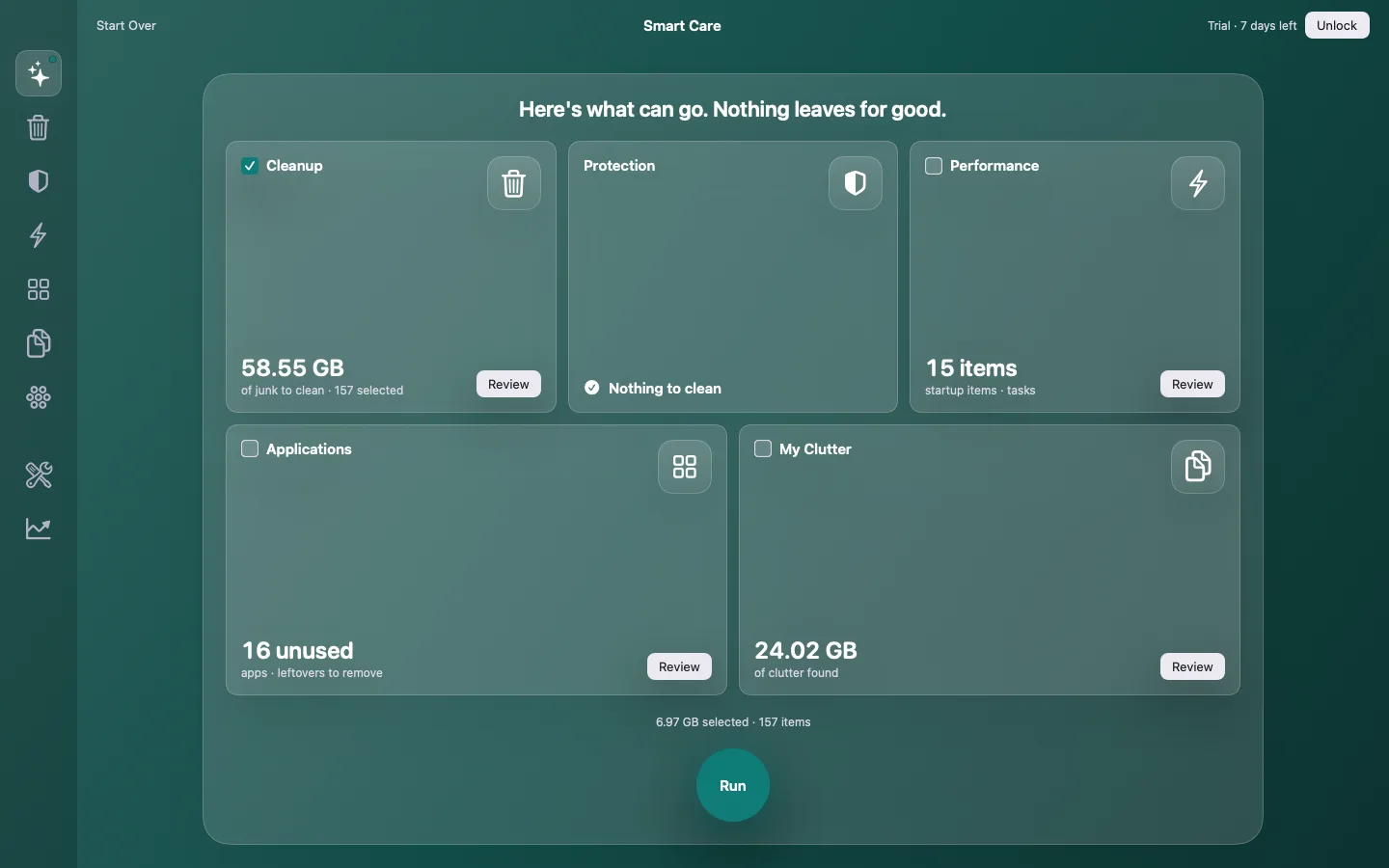
The Smart Care results screen: five tiles for Cleanup, Protection, Performance, Applications and My Clutter, each with a size and a Review button, and a Run button below.
01The real results screen, 1440 × 900. Nothing in it moves until you press Run.
!

Two things every cleaner gets wrong

The free scan that charges to delete

It finds the junk, asks for a card to remove it, then renews before you notice. Tio Uptomizer says what costs money before the first scan, takes no card for the trial, and sells one licence, once.

Taking something you needed

A browser's passwords, a licence key, the helper your sign-in relied on. Tio Uptomizer moves, never shreds: the Trash and a per-run log are the safety net, and a never-touch list you can read keeps sign-ins and licences out of reach.

01–03

How it works

01ScanOne pass, nothing moves

Caches, logs, Xcode and AI-tool leftovers, startup items, apps and their files, large and duplicate files, known malware. The list is the result; no file has been touched.

02DecideEvery item, size and path

Smart Selection ticks only what is safe. Untick anything, open it in Finder first, or add it to the Ignore List for good.

03RunTo the Trash, with a log

What you picked goes to the Trash. A log file records each item and the done screen says what went where. Changed your mind? Open the Trash or the log.

What makes it different

  • Reversible by default

    Trash, not delete. A log file per run in ~/Library/Logs/Tio Uptomizer. Restore from the log is in the first update.first update

  • A never-touch list you can read

    Keychain, Mail, Photos, sync caches, app licences, password helpers: listed in Settings, never offered.

  • Honest free tier

    Scanning is free forever. Cleaning needs a 7-day trial or a key. No card. Nothing renews; the trial simply ends.

  • Developer-grade junk

    Xcode DerivedData, simulators and device support; caches of Claude, Cursor, Codex, Gemini and ChatGPT.Docker and package caches next

  • Pay once

    One Mac $34.99, Plus (2 Macs) $49.99, Family (5 Macs) $79.99. Twelve months of updates included. Move a seat to a new Mac yourself.

  • Private by construction

    No analytics, in the app or on this site. The licence check sends a key and a machine name. Malware definitions are downloaded; nothing is uploaded.

  • Not an antivirus

    Protection matches files against an open signature feed and flags startup items that hide in odd places: a second opinion next to macOS's own defences, not a replacement.

Also in the box, because every cleaner needs them: Smart Care, Cleanup, Protection, Performance, Applications, My Clutter, Space Lens, a menu bar monitor, My Activity and My Tools.

Fares

One Mac

×1

$34.99

One person, one machine.

  • One activation, one key
  • 12 months of updates
  • 30-day money back

Plus

×2

$49.99

A laptop and a desktop.

  • Two activations, one key
  • 12 months of updates
  • 30-day money back

Family

×5

$79.99

The household's Macs.

  • Five activations, one key
  • 12 months of updates
  • 30-day money back

Scanning is always free. Prices in USD; tax and local currency are handled at checkout by Lemon Squeezy. After the first year the version you have keeps working; further updates are an optional separate purchase, never a renewal.

Service notes

Does it delete anything permanently?

Only two things, and both say so before you click: items already in a Trash, and files you remove with "Move to the Trash" turned off in Settings.

Is the scan really free?

Yes, forever, with no account. The trial covers cleaning for 7 days.

What happens when the trial ends?

Nothing. No charge, no account. Scans keep working; cleaning waits for a key.

Can I move my licence to a new Mac?

Yes. Settings ▸ Account ▸ Deactivate this Mac frees the seat; activate on the new one.

Does it need Full Disk Access?

For other apps' caches, yes, like any cleaner. It asks once and tells you what it skips without it.

What is the root helper?

System caches, logs and background items need it. It is installed only when you press Install, approved by you in System Settings, and accepts requests only from this app.

Which Macs?

macOS 14 or newer, Apple silicon and Intel. The download is a notarized DMG.

Try it on the Mac you were about to clean by hand

Download, scan for free, and read the log before you buy anything.

SHA-256 210a6c5c…ca7e57e · macOS 14+

Not shipping yet?

The waitlist opens with the launch. Until then the support page is the way to reach us; no address is collected here.